Breaking Language Barriers: How Nicolas Is Welcoming the World
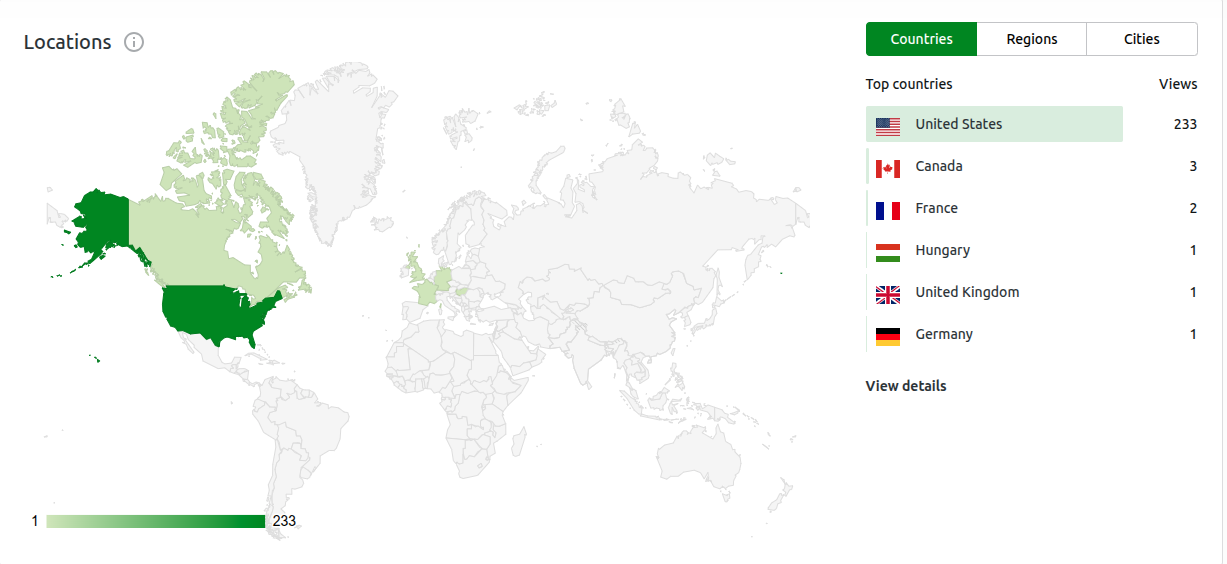
One of the most exciting updates to Archinic Designs this year has been the addition of a powerful new language translation system — and the impact has been immediate. Since launching it, the site has seen a surge of international visitors, with traffic now coming from more countries than our analytics illustration even shows. It’s clear that the world is knocking, and now the door is wide open.
At the moment, visitors can choose their preferred language using the flag-based selector at the top of the site. What makes this tool truly impressive is that it doesn’t just translate the text on a single page. It translates everything — navigation menus, buttons, image captions, product descriptions, and even the finer UI elements that often get overlooked. The result is a fully localized experience that feels natural, not patched together.
I’m still exploring whether to keep the manual selection or move toward automatic language detection based on browser or country settings. Both approaches have their strengths, and both shape how visitors experience the site from the very first moment.
Why This Upgrade Matters More Than You Might Think
Adding intelligent translation isn’t just a technical enhancement — it’s a strategic shift in how Archinic Designs connects with the world.
1. Instant Localization Builds Trust
When someone lands on the site and immediately sees content in their native language, it creates an instant sense of comfort. It tells them: You belong here. This space was built with you in mind. That’s a powerful first impression for any design studio.
2. Higher Engagement Across the Board
Visitors stay longer when they can read effortlessly. They explore more pages, dive deeper into the portfolio, and spend more time understanding the design philosophy behind each digital product. That extra time often translates into conversions — whether that’s a download, a purchase, or a new client inquiry.
3. Lower Bounce Rates and More Meaningful Visits
Language barriers are one of the quickest ways to lose international traffic. Removing that barrier keeps visitors engaged long enough to appreciate the work — and long enough to become customers.
4. Global SEO Benefits You Can’t Ignore
Search engines love multilingual content. With proper indexing, the site can begin ranking in multiple countries and languages, expanding organic reach without additional marketing spend. It’s a long-term investment that pays off quietly but consistently.
5. Accessibility and Inclusivity as a Design Principle
Offering multiple languages isn’t just a feature — it’s a commitment to inclusivity. It ensures that architectural concepts, digital products, and creative ideas are accessible to a broader, more diverse audience.
6. A Stronger Global Brand
A multilingual site signals that Archinic Designs isn’t just a local studio — it’s a global creative brand. It shows readiness to serve clients and customers from anywhere, without friction or barriers.
What’s Next: Manual vs. Automatic Language Selection
The next decision is whether to keep the manual flag-based selector or switch to automatic detection. Each has its advantages:
Manual selection gives visitors full control and avoids incorrect assumptions.
Automatic detection creates a seamless, “no thinking required” experience.
A hybrid approach which auto-detects on the first visit, with a visible manual override often delivers the best of both worlds.
Final Thoughts Language Plugin
This translation upgrade is more than a technical improvement. It’s a bridge — one that connects Archinic Designs to a global audience eager to explore, learn, and engage. By removing language barriers, the site becomes a place where creativity travels freely, and where visitors from around the world can experience your work exactly as you intended.
One Note Mentioning is I did have an issue with the plugin changing my heading on one particular post. Tried, html code, tried, java script, and php code. No luck so I just decided to modify the Blog Post instead. Will post another as a quick test to see if the problem is only when I use words that sound similar and somehow it autocorrects, not sure why. Regardless, a great Translation application.
Leave a Reply